
Time Management
Friends often ask me how to practice time management in Obsidian LifeOS? 📊
For time management in Obsidian LifeOS, my recommendation is to only track your time spent on key matters, as these are the things you truly need to invest significant time and energy in. If you're spending too little time on key matters, you need to spend more! 📈 Tracking unimportant matters is actually a waste of time.
According to the PARA organization method, each project is your "key matter," so we only need to track time spent on these! 🔑
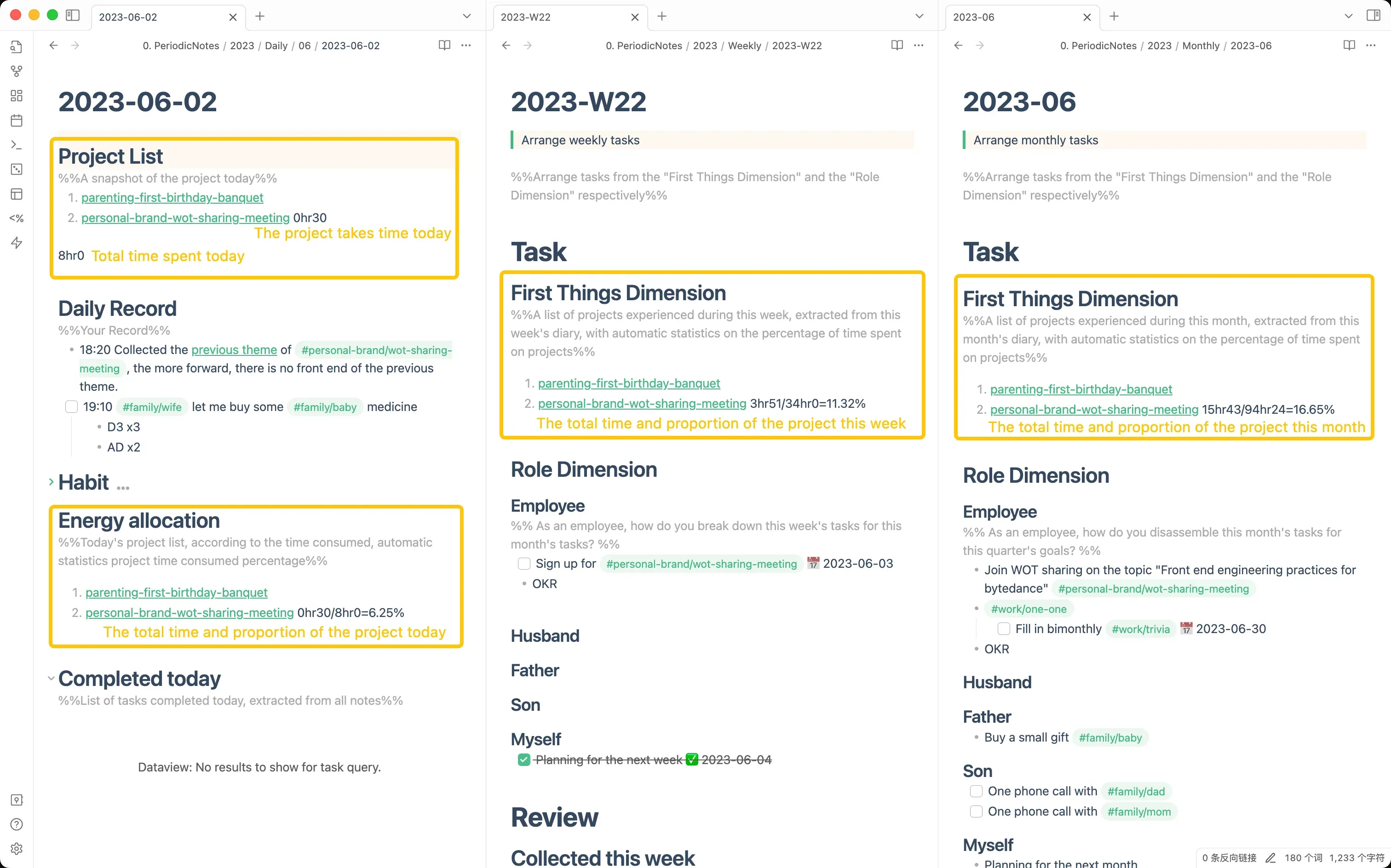
In practice, many people mistakenly think this can be automatically tracked, but in reality, the time spent on each project every day needs to be recorded manually, because only you know where your time went! However, you can use tools like the Pomodoro timer 📱 or Timemator 🖥️ to track time. My method is to use computer screen-on time as the total daily time spent, and Timemator records the time spent on various projects each day. This way, weekly, monthly, quarterly, and yearly project lists can automatically calculate the proportion of time spent. 📅
Summary
1️⃣ Tool Assistance
Use tools like the Pomodoro timer or Timemator to manually record daily time consumption on various projects. ⌛🔧
LifeOS Pro has a built-in Pomodoro Timer that automatically records time spent to your daily note's project list after timing completes - no manual entry required!
2️⃣ Manual Tracking
In the project list section of a daily note, manually track the time spent on each project and enter the day's total time on a separate final line. This provides the source data for weekly, monthly, quarterly, and yearly notes. 📝
The final 8hr20 line is the day's total time and the baseline LifeOS uses to calculate project time proportions. Keep the total on its own line without a list marker. The total does not have to equal the sum of project time; in this example, the projects account for 4hr30 and the remaining 3hr50 is time not assigned to a project.
The formula is: project time proportion = time spent on one project ÷ total time for the day. Convert both values to minutes first. For example, Product Launch is 3hr00 (180 minutes) and the day's total is 8hr20 (500 minutes), so 180 ÷ 500 = 36%.
3️⃣ Periodic Summarization
The LifeOS plugin reads data from step 2 and automatically calculates the proportion of time spent on each project in "Weekly Notes," "Monthly Notes," "Quarterly Notes," and "Yearly Notes." 📉📆
Through this management method, you can truly understand "where your time went," more efficiently adjust and plan your time, and give your key matters more attention! 🚀